Validation Portal
Click here to access the Epic1 Validation Portal
|
|
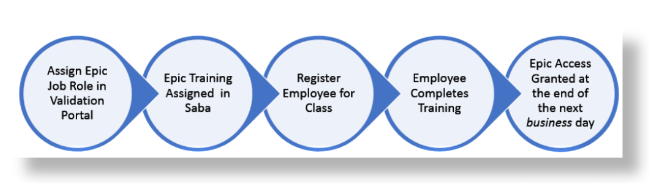
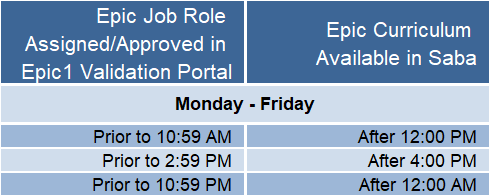
Path to Epic Access
Use your Chrome browser to log into the
Validation Portal. Find your new employee in your list and assign an Epic Job Role. Assigning a role in the Validation Portal is the first step for any employee or non-employee who requires access to Epic. Assigning the Epic Job Role sends the curriculum assignment to Saba, and also lets the Epic1 security team know what access your employee needs once they finish their Epic classes. Epic access is granted by the end of the next business day after the employee or non-employee completes training.
Non-employees will need a BJCNT-ID or WUSTL Key before being placed in the Portal.
BJC Managers: After you have their BJCNT-ID, access the
User’s Guide in the Help Menu of the Validation Portal to add the non-employee to your employee list.
WU Security Contacts: After the non-employee has been assigned a WUSTL Key and has been processed by HR, the person will appear in the Validation Portal within 1—2 business days.
You can also reach Epic1 training at
[email protected] with any questions on your non-employees.
Note: The Epic1 team does not request BJCNT IDs or WUSTL Keys for non-employees.